


Gameram: Find gaming teammates
4.5996.00 Reviews
App Specs
- Version
- 1.134.0
- Updated On
- License
- Free
- Downloads
- 5,000,000+
- Developer
- GAMERAM LTD
- Categories
- Social
- Platform
- Android, iOS
Screenshots
 Analysis by AppCompare
When I choose a social app for gaming, I first ask a practical question: will it help me find people I can actually play with, or will it become another feed to check? Gameram is built around that decision. It gives gamers a place to look for teammates and make connections, rather than relying only on whoever happens to be online in a game lobby. That focus makes it most appealing when I want a regular group, or when friends are unavailable and I would rather meet players with similar interests than queue alone.
It is a free social app from GAMERAM LTD, with optional in-app purchases priced from $2.49 to $17.99 per item. The app is rated Teen, so I would treat it as a social space for older teens and adults, not as a child-focused gaming tool. It has an average rating of 4.6 from around 42,000 ratings and more than five million installs, which suggests that many people have tried it, though popularity alone cannot tell you whether the community around your particular game and schedule will suit you.
Decide by the kind of gaming connection you need
The key question is whether you want to meet people beyond the games you already play. If your goal is simply to send a quick message to a friend, your game’s built-in chat or a general-purpose messaging app may be simpler. If you want a wider pool of potential teammates, conversation, and gaming-focused social activity in one place, this app has a clearer reason to exist. I would judge it less as a replacement for every gaming tool and more as a place to begin making connections.
That distinction matters because finding a promising profile is only the start. A good teammate also needs to be available when you are, communicate in a way you enjoy, and share expectations about the session. Before committing to a long campaign or ranked evening with someone new, I would use an initial short, low-pressure session to see whether the conversation and play style feel comfortable. This is a simple way to avoid confusing a shared game preference with genuine compatibility.
Where its social focus can make a difference
For a player who has recently started a multiplayer game, the hardest part can be getting past the first awkward lobby. A gaming-centered community gives you a more natural opening than approaching strangers with no context: you can start from a shared interest and see whether it turns into a reliable party. It can also help returning players reconnect with the social side of a game after their old group has moved on. The strongest fit is someone who is willing to start conversations, not someone expecting an app to assemble a perfect team without any effort.
A realistic use case is a player who has a free evening but no dependable group. Instead of spending the whole session joining random matches, they can look for people interested in the same game, make contact, and arrange a first session. I would keep that first plan specific: agree on when to play, what kind of session everyone wants, and whether voice communication is important. Those small details reveal more about whether a group will work than a profile alone can.
Gameram was released on July 19, 2020, and its current version is 1.128.0. It requires Android 8.0 or later. Its longevity and large audience are encouraging starting points, but I would still check whether recent activity feels relevant to the games I care about. A broad community can be useful, yet the practical value depends on finding people who are active at the times I play rather than merely seeing a large overall user base.
Worth Reading Before You Choose

EA SPORTS FC Mobile 26 Is a Bigger Football Game, but It Takes Time

Flipboard Shows What News Apps Must Do Beyond the Feed

Switching to Android Auto Means Rethinking Your Driving Routine

Google Calendar Makes a Crowded Week Easier to Manage

Ludo King Makes the Most of the Minutes Between Plans

Baby Panda World Brings Quick Play to Modern Phones, but Its Game Library Feels Busy
Choose between a gaming community and familiar alternatives
Compared with a game’s own lobby, a dedicated social app can be a better place to make connections that extend beyond one match. In-game systems are convenient when I need an immediate party, but they are often tied to that title and that moment. A gaming community has a different role: it can give people room to talk about interests and build familiarity before playing. The trade-off is that it takes more initiative, and a social app cannot guarantee that a conversation will lead to a dependable teammate.
General chat servers and broad social networks are another alternative. They may already be where a friend group gathers, so there is little benefit in asking everyone to move elsewhere. But when I am trying to meet new players rather than coordinate people I already know, a service centered on gaming has a more relevant starting point. I would not migrate an entire group just for the sake of trying a new app; I would use it when the existing channels are not helping me find the kind of company I want.
The best choice also depends on how much social discovery you enjoy. If I want to play immediately and avoid introductions, matchmaking inside a game is likely the smoother route. If I like talking about games and gradually building a group, Gameram’s social purpose makes more sense. If I mainly want a quiet utility for arranging a single session, a calendar or messaging tool may be enough. Thinking about that difference before joining helps keep expectations realistic.
What to consider before moving your routine
Switching tools has a small but real cost: people need to check another place, respond there, and remember where a plan was made. For a solo player, that can be worthwhile if it opens the door to new teammates. For a settled group that already communicates smoothly, an extra social app may split conversations rather than improve them. I would try it alongside my current setup first, then keep using it only if it leads to useful connections or enjoyable community activity.
Because this is a social space, I would also take ordinary care when meeting people online. Keep early conversations within the app, avoid sharing personal details unnecessarily, and be selective about moving a new connection into a private channel or an in-person meeting. A shared interest in a game is a good conversation starter, not proof that someone is trustworthy. That cautious approach does not make the experience less social; it lets me enjoy meeting people while keeping sensible boundaries.
The free entry point makes it easy to explore, while the optional purchases mean spending is not the same thing as joining. I would start without buying anything and decide later whether a paid item solves a need I actually have. A purchase is poor value if I have not yet found an active circle or a reason to return. The more important early test is whether I can find conversations and players that fit my preferences.
Connecting Gamers Worldwide
So, let’s get right into it. The first thing you notice about Gameram is its sleek and user-friendly interface. It’s like stepping into a virtual gaming café where everyone shares your passion for gaming. Setting up your profile is a breeze. Within minutes, I was up and running, ready to find my next gaming squad.
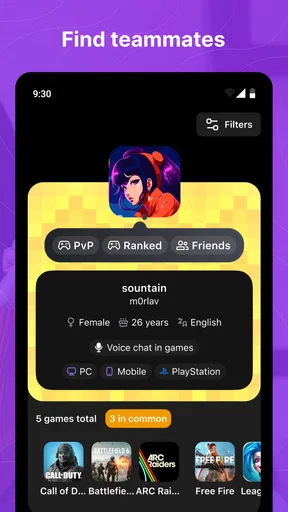
The app’s matchmaking feature is a standout. You can filter potential teammates based on game preferences, skill level, and even time zones. This is a game-changer for anyone tired of ending up with players who don’t match their style or schedule. Whether you’re a night owl or an early bird, Gameram has got you covered.
Features That Level-Up Your Gaming Experience
Now, let’s talk features. One of the coolest aspects of Gameram is its integrated chat system. You can communicate with your team directly through the app, making it easy to strategize and plan your next move. No more jumping between platforms or dealing with clunky chat systems that lag behind the action.
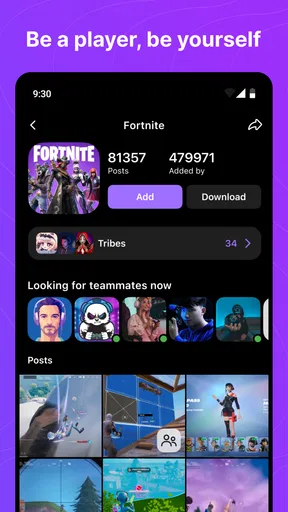
Another neat feature is the community groups. You can join or create groups based on your favorite games or gaming topics. It’s a great way to share tips, discuss updates, or just geek out over the latest releases. Plus, the app supports multiple languages, making it accessible for gamers worldwide.
Oh, and did I mention the event scheduling? You can plan gaming sessions and invite your friends directly through the app. It’s perfect for organizing weekend raids or casual gaming nights.
The Social Aspect: More Than Just Gaming
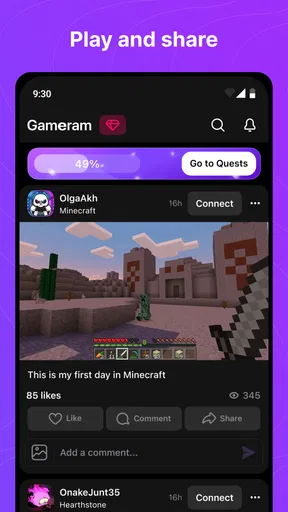
While gaming is the main focus, Gameram also emphasizes the social aspect. It’s not just about finding teammates; it’s about building a community. You’ll find forums for discussing game strategies, sharing fan art, or even organizing in-person meetups. It’s like having a mini social network dedicated entirely to your gaming obsession.
The app encourages interaction with its achievement system. You earn badges and ranks as you engage with the community, adding a fun, gamified layer to the whole experience. It’s a subtle nudge to stay active and connected.
Seamless Integration with Your Gaming Life
One thing I appreciate about Gameram is how seamlessly it integrates with my gaming life. The notifications are customizable, so you get alerts for the things that matter most. Whether it’s a message from your team or an upcoming event, you’re always in the loop without being overwhelmed.
The app also respects your privacy. You can control who sees your profile and what information is shared, giving you peace of mind as you connect with new players. It’s thoughtful touches like these that make using Gameram a pleasant experience.
Final Thoughts: A Must-Have for Gamers
So, is Gameram worth downloading? Absolutely. It’s a fantastic tool for anyone serious about gaming, offering a robust platform to connect, communicate, and collaborate with other players. Whether you’re a casual gamer or a competitive pro, this app offers features that cater to all levels and preferences.
It’s not just an app; it’s a community. From its intuitive design to its comprehensive features, Gameram has carved a niche in the gaming world that’s hard to ignore. So why not give it a try? Your next epic gaming adventure awaits!
My recommendation comes with one qualification: treat the first few sessions as a way to test the community, not as a promise that every contact will become a regular teammate. Try a narrow search around the game and schedule you actually play, then notice whether people follow through and whether the conversation stays pleasant. If the app helps you turn one promising introduction into a repeat session, it has already done something a random lobby may not.
I would skip it if I rarely play socially, dislike meeting new people online, or already have a group whose current setup works well. It is also not the best fit when I need a tool solely for voice coordination during a match; a familiar game chat or voice service may be more direct for that job. For players who want to widen their circle, though, Gameram is worth trying as a low-commitment starting point. Keep the first plans simple, protect your personal boundaries, and let actual interaction—not the size of the community—decide whether it earns a place in your gaming routine.
Pros
- Connects gamers worldwide easily.
- User-friendly interface for quick navigation.
- Diverse community with various game interests.
- Real-time chat for instant communication.
- Customizable profiles to showcase skills.
Cons
- Limited game titles available for matching.
- Occasional connectivity issues reported.
- Some profiles lack detailed information.
- Ads can be intrusive at times.
- Requires stable internet for optimal use.
FAQs for Gameram: Find gaming teammates
What is Gameram and how does it work?
Gameram is a social networking app designed specifically for gamers to find and connect with teammates across various games. It allows users to create profiles, join communities, and participate in discussions. The app uses interest-based algorithms to match players based on their preferences, skill levels, and gaming needs, making it easier to find compatible teammates.
Is Gameram free to use, or are there any in-app purchases?
Gameram is free to download and use, allowing users to access most of its features without any cost. However, the app does offer in-app purchases, which may include premium features like advanced matchmaking options, ad-free experience, or exclusive community access to enhance the user experience.
Can I use Gameram to connect with players for any game?
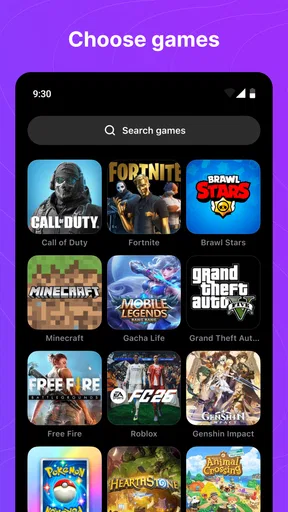
Yes, Gameram is designed to support a wide variety of games, from popular titles to niche genres. The app's community-driven approach allows users to discover and join groups or forums dedicated to specific games, ensuring that you can find teammates or discussions related to almost any game you're interested in.
How does Gameram ensure a safe and friendly environment for users?
Gameram prioritizes user safety by implementing robust moderation tools and reporting systems. Users can report inappropriate behavior or content, and the app employs a team dedicated to monitoring and addressing such issues. Additionally, Gameram encourages a positive community by promoting respectful interactions among users.
What devices and operating systems are compatible with Gameram?
Gameram is available for both Android and iOS devices, ensuring compatibility with a wide range of smartphones and tablets. Users can download the app from the Google Play Store or Apple App Store, respectively, and it supports most modern operating systems to provide a smooth and efficient user experience.


